Happy New Year Festival and Celebration Old Price is 1650/INR
Now You can Buy this Book in 1250/INR
2024 New Year Price is 1250 With Courier Charges
10 Books Package in 9000/INR With courier Charges For Institute and Educational Training Centres.
Contact Naveen +91 99913 15036
https://electronics-tricks.blogspot.com/
With the advancement of science and technology, TVs have changed a lot from the earliest black-and-white TVs to color TVs and now to today's LCD TVs. However, after a TV has been used for a period of time, various malfunctions cannot be avoided. Today I will introduce Here are some repair methods for you if your LCD TV breaks down, let’s take a look!
Welcome to follow the WeChat public account "Hotwater Heater Repair Phone Number" to get more home appliance repair information!
1. TV hardware failure - TV screen is black and there is sound
Solution: Check the plugs on the back of the TV to see if each plug is in a specific position, and confirm if there is any looseness at the socket. If so, just fix it.
After troubleshooting the socket problem, if the black screen of the TV has not been resolved, then it is a hardware problem. At this time, do not disassemble it yourself. You must contact the relevant after-sales maintenance personnel for inspection.
2. The TV screen suddenly goes black and cannot be started.
Solution: Observe the power indicator light of the TV. If the power indicator light does not light up, it means a sudden power outage and a black screen due to a power connection problem. At this time, you can check whether there is a power outage at home, whether the power plug is loose, and whether the power cord is faulty.
If the power indicator light is on, it is a hardware problem. Users who do not understand the specific internal structure of the TV need to contact after-sales maintenance personnel for testing.
3.TV screen blur
Solution: First, measure whether the clock output of the motherboard is normal, then check the motherboard signal RGB, whether there is any soldering or short circuit in the circuit from the input to the main chip, see whether the capacitor and resistor have changed values, then check the motherboard signal, and the output to the screen. Check whether there is any soldering or short circuit in part of the circuit of the connecting socket. If so, please contact a professional for repair in time.
Another situation is that the TV display is broken. At this time, it may be necessary to replace the TV display to solve the problem of TV screen blur. You also need to contact a professional for repair.
4. TV software failure causes TV to freeze or freeze.
Solution: When you find that the TV freezes or stuck you can download TV Assistant from the TV App Store to clear some useless or stolen memory in the TV. Usually, after installing the software, check whether any participating APK installation packages remain in the TV system. Because some software will leave installation packages in the system after automatic upgrades, which need to be cleaned up in time.
5. Unable to install software applications
Solution: Enter the setting options in the TV system, find the corresponding item, and turn on the switch that the TV manufacturer defaults to disable USB installation of TV software, and you can install it through USB. If you find that you cannot install a third-party application, you can find the installation option of the third-party application in the settings and turn on this option to install the third-party software.
6. There is a problem with the TV parsing package
Solution: Since the user did not download the complete installation package during the download process, just re-download and install it again.
If the installation package downloaded by the user does not match the system version of the TV, there will also be problems parsing the package. At this time, the TV system can be re-upgraded and installed again.
The above are the common troubleshooting methods for LCD TVs. To learn more about home appliances, please contact +923139292880 my WhatsApp number.
Common Problems
Not turning on: The power indicator light does not light up. Usually the power board or motherboard is broken. If it is an all-in-one board, just replace it as a whole. If the power board outputs 12V to the motherboard, it means the motherboard is bad. The second is that the power-on indicator light is on, but the indicator light does not flash when the power button is pressed or the remote control is turned on. Generally, the motherboard is broken.
Black screen at startup: There is sound but no image. This kind of fault is most likely to cause the backlight to be damaged. You can use a flashlight to shine on the screen and you will see the image. There are also cases where the power board is broken and the backlight output voltage is low, causing a black screen. Specifically, you need to use a multimeter to measure whether there is voltage at the backlight output when the power is turned on.
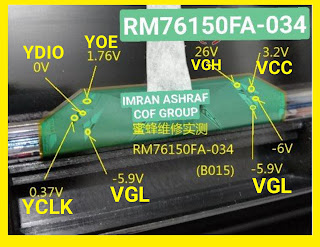
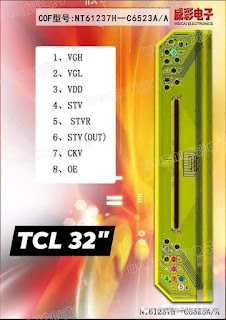
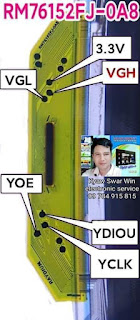
Gray screen at startup: The sound is normal, the backlight is bright, and there is no image on the screen. Usually the problem is the screen. The logic board is broken or the screen is broken. The LVDS cable is loose and the screen will be gray. Disconnect the cable from the logic board to the screen and measure whether the logic board voltage is normal. If it is normal, the screen is broken. If the screen Cof is broken, you need to go to a professional. You can only replace the screen when repairing. If there is a short circuit in Y, you can directly cut off the damaged side to repair it.
Unusual Picture: The motherboard is broken or the screen parameters are incorrect. If the image is white or dark, it may be that the logic board is broken.
Horizontal and vertical lines: Generally, the COF on the screen is broken. A screen pressing machine is required for repair.
Happy New Year Festival and Celebration Old Price is 1650/INR
Now You can Buy this Book in 1250/INR
2024 New Year Price is 1250 With Courier Charges
10 Books Package in 9000/INR With courier Charges For Institute and Educational Training Centres.
Contact Naveen +91 99913 15036
https://electronics-tricks.blogspot.com/
With the advancement of science and technology, TVs have changed a lot from the earliest black-and-white TVs to color TVs and now to today's LCD TVs. However, after a TV has been used for a period of time, various malfunctions cannot be avoided. Today I will introduce Here are some repair methods for you if your LCD TV breaks down, let’s take a look!
Welcome to follow the WeChat public account "Hotwater Heater Repair Phone Number" to get more home appliance repair information!
1. TV hardware failure - TV screen is black and there is sound
Solution: Check the plugs on the back of the TV to see if each plug is in a specific position, and confirm if there is any looseness at the socket. If so, just fix it.
After troubleshooting the socket problem, if the black screen of the TV has not been resolved, then it is a hardware problem. At this time, do not disassemble it yourself. You must contact the relevant after-sales maintenance personnel for inspection.
2. The TV screen suddenly goes black and cannot be started.
Solution: Observe the power indicator light of the TV. If the power indicator light does not light up, it means a sudden power outage and a black screen due to a power connection problem. At this time, you can check whether there is a power outage at home, whether the power plug is loose, and whether the power cord is faulty.
If the power indicator light is on, it is a hardware problem. Users who do not understand the specific internal structure of the TV need to contact after-sales maintenance personnel for testing.
3.TV screen blur
Solution: First, measure whether the clock output of the motherboard is normal, then check the motherboard signal RGB, whether there is any soldering or short circuit in the circuit from the input to the main chip, see whether the capacitor and resistor have changed values, then check the motherboard signal, and the output to the screen. Check whether there is any soldering or short circuit in part of the circuit of the connecting socket. If so, please contact a professional for repair in time.
Another situation is that the TV display is broken. At this time, it may be necessary to replace the TV display to solve the problem of TV screen blur. You also need to contact a professional for repair.
4. TV software failure causes TV to freeze or freeze.
Solution: When you find that the TV freezes or stuck you can download TV Assistant from the TV App Store to clear some useless or stolen memory in the TV. Usually, after installing the software, check whether any participating APK installation packages remain in the TV system. Because some software will leave installation packages in the system after automatic upgrades, which need to be cleaned up in time.
5. Unable to install software applications
Solution: Enter the setting options in the TV system, find the corresponding item, and turn on the switch that the TV manufacturer defaults to disable USB installation of TV software, and you can install it through USB. If you find that you cannot install a third-party application, you can find the installation option of the third-party application in the settings and turn on this option to install the third-party software.
6. There is a problem with the TV parsing package
Solution: Since the user did not download the complete installation package during the download process, just re-download and install it again.
If the installation package downloaded by the user does not match the system version of the TV, there will also be problems parsing the package. At this time, the TV system can be re-upgraded and installed again.
The above are the common troubleshooting methods for LCD TVs. To learn more about home appliances, please contact +923139292880 my WhatsApp number.
Common Problems
Not turning on: The power indicator light does not light up. Usually the power board or motherboard is broken. If it is an all-in-one board, just replace it as a whole. If the power board outputs 12V to the motherboard, it means the motherboard is bad. The second is that the power-on indicator light is on, but the indicator light does not flash when the power button is pressed or the remote control is turned on. Generally, the motherboard is broken.
Black screen at startup: There is sound but no image. This kind of fault is most likely to cause the backlight to be damaged. You can use a flashlight to shine on the screen and you will see the image. There are also cases where the power board is broken and the backlight output voltage is low, causing a black screen. Specifically, you need to use a multimeter to measure whether there is voltage at the backlight output when the power is turned on.
Gray screen at startup: The sound is normal, the backlight is bright, and there is no image on the screen. Usually the problem is the screen. The logic board is broken or the screen is broken. The LVDS cable is loose and the screen will be gray. Disconnect the cable from the logic board to the screen and measure whether the logic board voltage is normal. If it is normal, the screen is broken. If the screen Cof is broken, you need to go to a professional. You can only replace the screen when repairing. If there is a short circuit in Y, you can directly cut off the damaged side to repair it.
Unusual Picture: The motherboard is broken or the screen parameters are incorrect. If the image is white or dark, it may be that the logic board is broken.
Horizontal and vertical lines: Generally, the COF on the screen is broken. A screen pressing machine is required for repair.
With the advancement of science and technology, TVs have changed a lot from the earliest black-and-white TVs to color TVs and now to today's LCD TVs. However, after a TV has been used for a period of time, various malfunctions cannot be avoided. Today I will introduce Here are some repair methods for you if your LCD TV breaks down, let’s take a look!
Welcome to follow the WeChat public account "Hotwater Heater Repair Phone Number" to get more home appliance repair information!
1. TV hardware failure - TV screen is black and there is sound
Solution: Check the plugs on the back of the TV to see if each plug is in a specific position, and confirm if there is any looseness at the socket. If so, just fix it.
After troubleshooting the socket problem, if the black screen of the TV has not been resolved, then it is a hardware problem. At this time, do not disassemble it yourself. You must contact the relevant after-sales maintenance personnel for inspection.
2. The TV screen suddenly goes black and cannot be started.
Solution: Observe the power indicator light of the TV. If the power indicator light does not light up, it means a sudden power outage and a black screen due to a power connection problem. At this time, you can check whether there is a power outage at home, whether the power plug is loose, and whether the power cord is faulty.
If the power indicator light is on, it is a hardware problem. Users who do not understand the specific internal structure of the TV need to contact after-sales maintenance personnel for testing.
3.TV screen blur
Solution: First, measure whether the clock output of the motherboard is normal, then check the motherboard signal RGB, whether there is any soldering or short circuit in the circuit from the input to the main chip, see whether the capacitor and resistor have changed values, then check the motherboard signal, and the output to the screen. Check whether there is any soldering or short circuit in part of the circuit of the connecting socket. If so, please contact a professional for repair in time.
Another situation is that the TV display is broken. At this time, it may be necessary to replace the TV display to solve the problem of TV screen blur. You also need to contact a professional for repair.
4. TV software failure causes TV to freeze or freeze.
Solution: When you find that the TV freezes or stuck you can download TV Assistant from the TV App Store to clear some useless or stolen memory in the TV. Usually, after installing the software, check whether any participating APK installation packages remain in the TV system. Because some software will leave installation packages in the system after automatic upgrades, which need to be cleaned up in time.
5. Unable to install software applications
Solution: Enter the setting options in the TV system, find the corresponding item, and turn on the switch that the TV manufacturer defaults to disable USB installation of TV software, and you can install it through USB. If you find that you cannot install a third-party application, you can find the installation option of the third-party application in the settings and turn on this option to install the third-party software.
6. There is a problem with the TV parsing package
Solution: Since the user did not download the complete installation package during the download process, just re-download and install it again.
If the installation package downloaded by the user does not match the system version of the TV, there will also be problems parsing the package. At this time, the TV system can be re-upgraded and installed again.
The above are the common troubleshooting methods for LCD TVs. To learn more about home appliances, please contact +923139292880 my WhatsApp number.